Frame: Focused Breathing
Shipped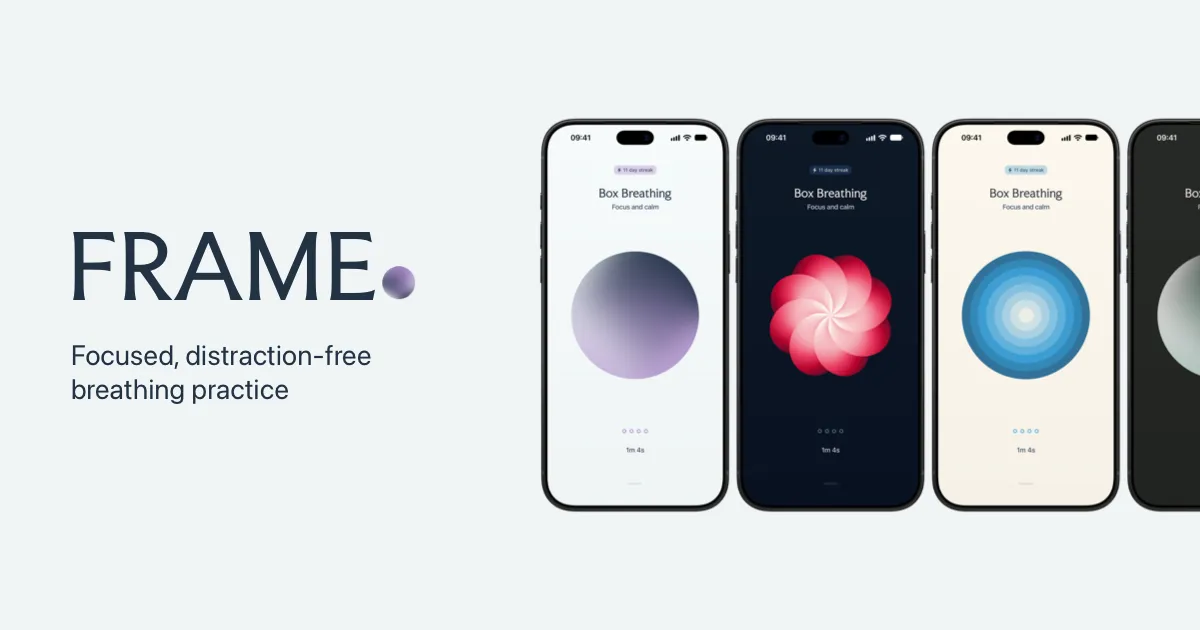
Frame is a minimalist app for people who want to break negative cycles through common breathing exercises. Built around a single, focused interface, Frame lets you practise mindfulness and reset your mood with nothing else competing for your attention.
Why a breathing app?
Let’s face it, there’s no shortage of breathing apps out there. In fact, there’s no shortage of apps for most things nowadays. But in a world where AI has made it trivial to spin up an app, craft becomes the differentiator. Shaping an experience with real design sensibility is hard to fake, and worth doing properly.
Frame was a perfect project for me. It combined my personal interest in wellness practices with an app that could be restrained in functionality and crafted at every interaction. It meant I could ship something quickly without getting bogged down in complex features or too much scope creep. I wrote more about getting it shipped in Enter Frame.
This is my attempt to build a simple, beautiful experience around a single concept: breathing.
How it works
The app revolves around a single breathing view featuring a dynamic graphic that syncs with the breathing pattern. You start an exercise by swiping down on the shape, which contracts, expands and holds with each breathing phase. Haptics reinforce each phase change too, so you can choose to look elsewhere or close your eyes during the practice.
With a simple swipe up from the drag handle, more functionality is revealed. You can choose from preset breathing patterns or create your own. There are basic insights for those who like to track progress, including the ability to sync mindful minutes with Apple Health, and you can change the theme and breathing shape to match your mood.
Everything that isn’t the breathing practice is secondary. The interface’s job is to get out of the way: one focal point, one motion, one purpose. The extras exist for people who want more, but they never detract from the core experience.
Crafting the experience
Every touch, swipe and movement has been carefully considered, even where most people will never notice. I believe these small details add up to an experience that feels calm and purposeful.
Core experience
The breathing shapes are all made with Metal and react instantly to swiping interactions. Every movement stays in sync: stop a practice at any moment and the shape eases back to where it started.
Sliding up from the handle reveals the drawer, with a UI that fades in from the background. You can then slide horizontally to increase or decrease the number of rounds to suit your needs.
Tapping the palette icon swaps the controls for theme options: the type shifts and other shapes peek in from the edges. Swipe down or tap Done to apply your new theme, and you can begin a new practice seamlessly.
Onboarding
The app is deliberately minimalist, so I spent a lot of time thinking about the onboarding experience to prime people for the interactions. The first step has you make the same gesture that starts a practice, and each step after introduces a little more.
Current status
Frame is out on the App Store right now, and I’m working on new features like sounds and widgets. Rest assured, whatever I release next will align with my original principle of not getting in the way of the breathing practice.
If you’ve used Frame, thank you. I really appreciate you taking the time to try my app. I would also love to hear from you, especially if you have feedback. Feel free to send me an email or reach out on Threads or X.